; VRE Mobile | Virginia Railway Express Skip to Main Content

VRE Mobile

Final_Mobile_Landscape

VRE_Mobile


Buy and use VRE tickets with your Smartphone


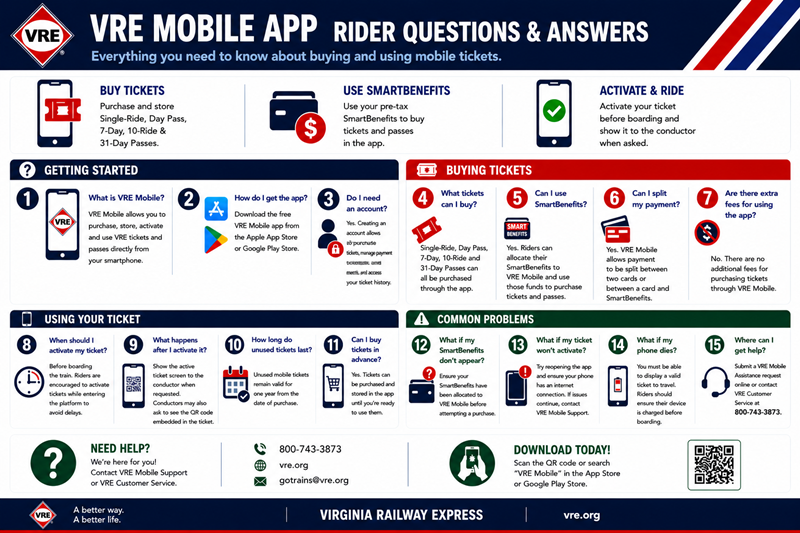
Our free VRE Mobile app makes buying and using VRE tickets and passes easier than ever. Download it for iPhone or Android to enjoy:

  • Single-Ride, Day Pass, Seven-Day, Ten-Ride, 31-Day  Passes delivered straight to your smartphone
  • No paper ticket to keep track of
  • No need to stop at a vendor location or Ticket Vending Machine
  • No guaranteed mail delivery fees to pay for
  • The choice to split payment between two cards, or a card and Smartbenefits account
  • The ability to purchase and validate tickets at your convenience

Download the VRE app from the Google Play storeDownload the VRE app from the Apple store


Getting Started on VRE Mobile

  • Create an Account 
  • Select Fare – choose which line you want to ride, your stations and fare type, and then press “Complete Your Order”
  • Pay – enter your credit card, debit card and/or SmartBenefits account number (if paying with SmartBenefits, make sure you allocate your funds to VRE Mobile first)
  • Validate & Show Ticket – before boarding your train, select “My Tickets” from the VRE Mobile menu, choose the ticket you want to use, and tap “Activate” – show this screen when the conductor asks to see your ticket


Need Help? Submit a VRE Mobile assistance request.


VRE Mobile

Close